Cloud-Managed Switching: How Cisco Meraki MS Series Transforms Network Operations
Cloud-Managed Switching: How Cisco Meraki MS Series Transforms Network Management for Growing Businesses
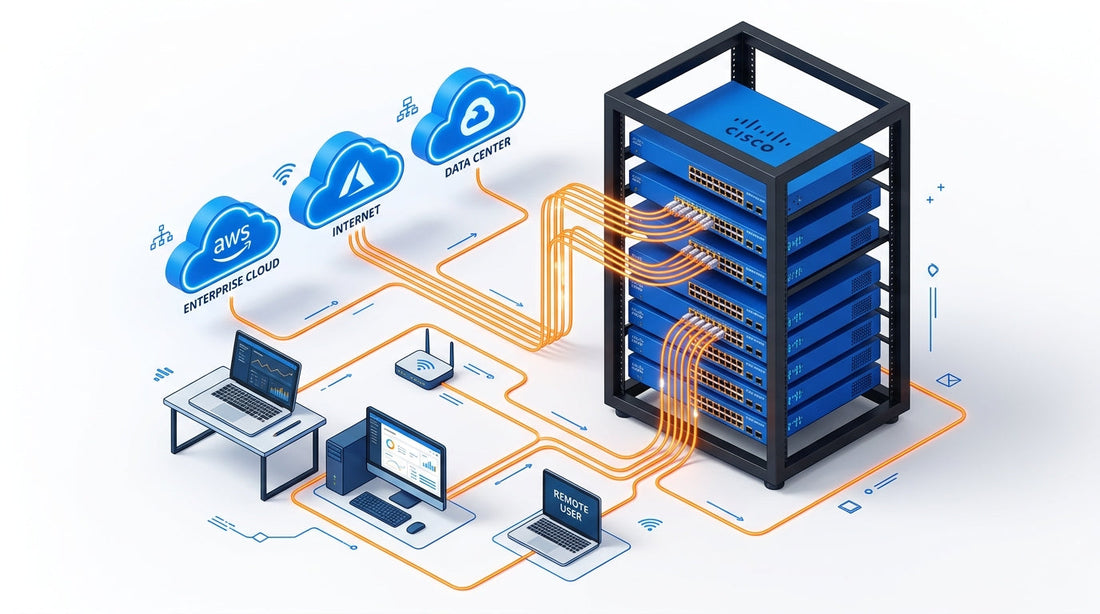
Every device in your office — laptops, IP phones, printers, security cameras, wireless access points — connects to the network through a switch. For most businesses, that switch sits in a closet, quietly doing its job until something breaks. And when it does, the scramble begins: find the credentials, ssh in, decipher the CLI, hope nothing cascades. Cisco Meraki's cloud-managed MS switching portfolio changes that equation entirely. From a single browser tab, your entire switching infrastructure becomes visible, configurable, and self-healing — whether you have one office or fifty.
"The average mid-sized business spends 30% of its IT budget simply keeping existing infrastructure running. Cloud-managed networking flips that ratio — more time building, less time firefighting."
What "Cloud-Managed" Actually Means for Switching
Traditional enterprise switches require deep CLI expertise, on-site configuration sessions, and often dedicated network engineers just to manage VLANs, QoS policies, and port configurations. Cisco Meraki takes a radically different approach: every MS switch — from the compact 8-port MS130-8 to the high-performance Catalyst 9300-M — is managed entirely through the Meraki Dashboard, a cloud-based control plane accessible from any browser, anywhere in the world.
That means when you need to configure a new VLAN across 20 branch switches, you do it once in the dashboard and it propagates instantly to every device. When a port goes down at your satellite office, you see the alert before your employees notice the problem. When a new hire joins and needs access to specific network segments, a few clicks in the dashboard — no truck roll required.
Key benefits of Meraki's cloud-first architecture for switching:
- ✓ Zero-touch provisioning — ship a switch directly to a remote site; it self-configures when plugged in
- ✓ Unified dashboard — manage switches, access points, and security appliances from a single pane of glass
- ✓ Automatic firmware updates — scheduled, tested, and pushed with zero manual intervention
- ✓ Real-time topology maps — see exactly how every device is connected, with live traffic data
- ✓ Built-in anomaly detection — AI flags unusual traffic patterns before they become outages
The MS Series Lineup: Right Switch for Every Business Need
One of the strengths of the Meraki switching portfolio is its range. There's no one-size-fits-all solution in networking, and Meraki's MS series spans compact office switches all the way to high-density aggregation hardware — all managed identically through the same dashboard.
Compact switches (MS130 series) are designed for small offices, retail locations, and branch deployments where rack space is limited. The MS130-8 packs 8 GbE ports into a slim form factor with optional PoE+ support, perfect for powering access points and IP phones without additional power bricks. The MS130R adds a rugged enclosure for environments like warehouses, manufacturing floors, or outdoor enclosures where temperature and durability matter.
Access switches (MS150 and MS210/225 series) form the backbone of most SMB and mid-market deployments. The MS150 introduces multigigabit (mGig) connectivity — critical for Wi-Fi 6/6E access points that saturate standard 1G uplinks — along with up to 60W PoE++ for powering next-generation devices. The MS225 adds 10G SFP+ uplinks for high-throughput aggregation without the cost of dedicated distribution hardware.
Layer 3 and distribution switches (Catalyst 9300-M) bring enterprise-grade performance to organizations that need inter-VLAN routing, advanced QoS, and up to 90W UPoE for high-power devices like digital signage or ceiling-mounted pan-tilt-zoom cameras — all with native Meraki Dashboard management from Day 0.
- ✓ Compact MS130 series: ideal for branch offices and small footprint deployments
- ✓ MS150 stackable: multigigabit uplinks and PoE++ for modern wireless-heavy environments
- ✓ Catalyst 9300-M: enterprise Layer 3 performance with cloud-native management
- ✓ Rugged MS130R: built for harsh environments without sacrificing cloud manageability
PoE Switching: Powering the Connected Office
Power over Ethernet has quietly become one of the most important capabilities in modern office infrastructure. Every wireless access point, VoIP phone, security camera, and environmental sensor in your building depends on PoE to function without dedicated power outlets. Meraki''s MS switches are engineered with PoE budgets that match real-world deployments — not just spec-sheet numbers.
The MS150 supports up to 60W PoE++ per port, enough to power even the most demanding 802.3bt devices. The MS225 with PoE+ can run an entire floor of wireless access points and IP phones from a single switch, with centralized power monitoring through the dashboard. If a device draws unexpectedly high power, you'll see it in real time — and you can set per-port power limits to prevent any single device from disrupting the rest of the stack.
- ✓ PoE+ (30W) for standard VoIP phones and access points
- ✓ PoE++ (60W) for high-power devices including outdoor cameras and digital signage
- ✓ UPoE (90W) on Catalyst 9300-M for next-generation powered devices
- ✓ Real-time per-port power monitoring and configurable limits via dashboard
Security Built Into Every Port
A switch is often the least scrutinized security boundary in a business network — and attackers know it. Rogue devices, VLAN hopping attacks, and unauthorized port access are real threats that traditional switches address poorly. Meraki MS switches integrate security at the port level, with features that go far beyond simple MAC address filtering.
Dynamic ARP Inspection (DAI) prevents man-in-the-middle attacks by validating ARP packets against a trusted binding table. 802.1X port authentication ensures only credentialed devices can access specific network segments. DHCP snooping blocks rogue DHCP servers that could redirect traffic to attacker-controlled infrastructure. And when combined with Meraki''s unified dashboard, these policies are enforced network-wide — any change you make to a security policy propagates to every switch simultaneously.
- ✓ 802.1X port-level authentication — only trusted devices connect
- ✓ Dynamic ARP Inspection — blocks man-in-the-middle attacks
- ✓ DHCP snooping — prevents rogue DHCP servers from hijacking traffic
- ✓ VLAN segmentation — isolate IoT devices, guests, and corporate traffic with ease
- ✓ Anomaly detection — dashboard flags unusual traffic patterns in real time
Scaling Without the IT Headaches
Growth is supposed to be a good problem. But for IT teams managing traditional switching infrastructure, every new office means another site visit, another round of CLI configuration, and another network that's slightly different from every other network you manage. Meraki''s template-based configuration eliminates that problem entirely.
Define your network configuration once — VLANs, QoS policies, security settings, port profiles — and apply it as a template to every new location. When you open your fifth office, the switch ships to the site, plugs in, downloads its configuration from the cloud, and is fully operational in under 30 minutes. No engineer on-site. No late-night configuration calls. Just a network that works from day one.
For businesses already running Meraki wireless or security, adding cloud-managed switching means consolidating everything into a single dashboard — access points, security appliances, cellular gateways, and switches all visible, manageable, and monitorable from one place. That's the Meraki ecosystem advantage: not just better individual products, but a fundamentally simpler operational model for your entire network.
- ✓ Configuration templates — deploy identical setups to unlimited locations instantly
- ✓ Zero-touch deployment — switches self-configure when connected to the internet
- ✓ Unified management — one dashboard for your entire network stack
- ✓ API access — automate provisioning and integrate with your existing IT tools
Is Cloud-Managed Switching Right for Your Business?
If you have more than one location, are planning to grow, or simply want to stop spending IT resources on reactive network firefighting — the answer is yes. The Meraki MS series is particularly compelling for businesses that lack dedicated network engineers on staff, operate distributed retail or hospitality environments, or want a consistent, auditable network baseline across every site.
The shift to cloud-managed switching isn't just about convenience. It's about reclaiming the hours your team spends troubleshooting network issues and redirecting that time toward projects that actually move your business forward. When your infrastructure manages itself, your IT team can manage the future.


Comments
Post a Comment